

Q: What is the SAS Content Management System?
A: The SAS Content Management System is a web-based system will allow designated users to update their department's home page without having to edit HTML or use dedicated web design software. It is based on the Joomla! open source content management software.
 Q: Who can use the SAS Content Management System?
A: The SAS Content Management System is available to any SAS Departments or Centers interested in upgrading or replacing their department’s web site.
Q: Who would benefit from using this system?
A: This system would most benefit departments who want to overhaul their website without spending a lot of money on third-party web designers or sending their staff for web design training. It would also benefit departments who want an "official Rutgers" look to their main page, and/or departments who would like to update their sites frequently with a minimum of difficulty.
Q: Do I need Dreamweaver, Contribute, FrontPage, or other special software to update my department’s web site using the SAS Content Management System?
A: No – all you need is a web browser and a connection to the Internet. The system is completely web-based and does not require any third-party web design software.
Q: What do SAS CMS web sites look like?
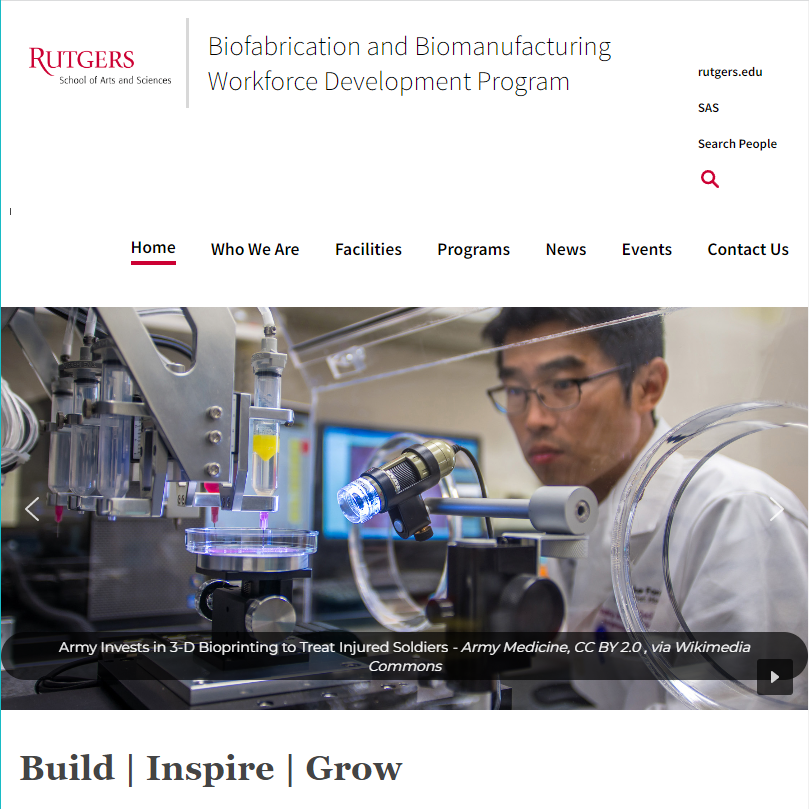
A: The Biofabrication and Biomanufacturing Workforce Development Program website is an example of a site that uses the SAS CMS Template:
Biofabrication and Biomanufacturing Workforce Development Program Website
This site is an example of what SAS unit web sites will look like using the Content Management System. The actual text and images can be changed to suit your department's needs using the Content Management System's web-based interface. This interface will allow you to update your department's home page without having to edit HTML or use web design software. The overall look in terms of fonts, colors, layout, and other non-content related elements will remain the same.
Q: How much control departments will have over design (e.g. will departments be able to control & adjust graphics on front page?) We would like to retain elements that illustrate department-specific characteristics. Can we keep our logos? Can we eliminate items from the template not relevant to our department?
A: The use of a basic template for all SAS departments is designed to facilitate the rollout of the content management system (CMS); as such, the overall look and feel of the main pages will remain relatively consistent across departments participating in the project. Departmental content contributors will be able to add text and some images to the pages, but within the format of the basic template.
Q: Who will determine rights of content contributors?
A: Initially, SAS system administrators will assign rights to content contributors, whom we give as much freedom as possible without compromising the integrity of the system. Each unit will have one or more site administrators, who can in turn create additional users as needed.
Q: Can personnel information be hidden from public view but accessible to valid departmental users (e.g. home mailing addresses & telephone numbers)?
A: While some content can be restricted to registered user, SAS has other resources that can better accommodate this functionality. The CMS will work best for the public pages of a department's website, but isn't the solution for every web-based problem. Departments will still have access to UNIX-based SAS web servers for traditional pages; these would be the ideal location for confidential personnel information, which can be password-protected.
Q: Will individual faculty members be able to update content of their own pages?
A: Individual faculty pages are not part of the scope of the content management project. We encourage faculty members to create their sites using the Sites@Rutgers system.
However, departmental CMS administrators can create individual content items for each faculty member, which can contain as much information as needed and in effect serve as mini-web pages. Of course, the link to the complete faculty member’s web site can be included.
Q: How would our staff learn how to use the CMS?
A: Your staff can get accounts for this Sandbox site in order to learn how the Content Management System works. To get an account for the SAS Sandbox, please submit a work order with your name, department, and email address.
SAS IT Services also offers CMS training workshops. You can see a list of scheduled workshops here. You can also join the SAS-CMS-ADMINS mailing list to be notified of future Joomla! training workshops.
Q: Sounds great! How do we sign up?
A: Please submit a work order with the following information:
- Unit's Name
- Current Website URL (if applicable)
- Primary contact of Content Management System administrator (name & e-mail address) - This will be the person in your department in charge of updating the website.